
Streamient, now in your terminal and Obsidian
Knowledge rarely begins inside a knowledge-management system.
It starts in a Markdown file, a meeting note, a terminal session, a Git repository, or a conversation with an AI assistant. When capturing that knowledge requires stopping work and copying it into another application, valuable context gets lost.
That is why we are introducing two new ways to use Streamient:
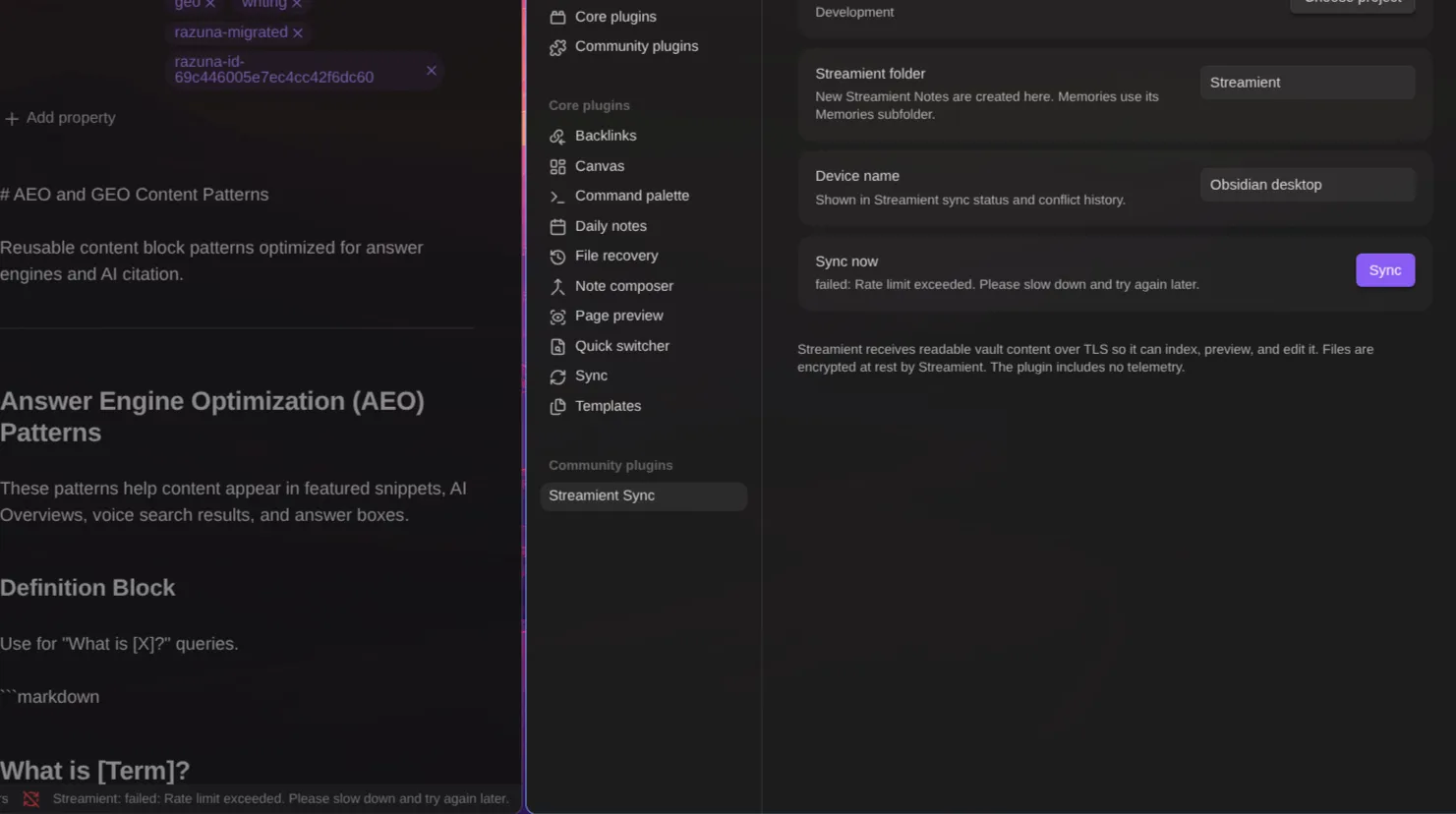
- Streamient Sync for Obsidian, creating a two-way connection between your vault and Streamient.
- The Streamient CLI, bringing Streamient's complete knowledge toolkit into your terminal, scripts, CI jobs, and agent workflows.
They serve different workflows, but share one goal: making you feel assured that your knowledge is seamlessly accessible across tools and teams, enhancing your confidence in the system's capabilities.
Keep using the Obsidian workflow you love
Obsidian has earned such a devoted following for good reason. It gives you ownership of your Markdown files, works across desktop and mobile, and can be shaped around the way you think.
We did not want Streamient users to choose between Obsidian and a shared, AI-ready memory layer.
Streamient Sync for Obsidian is an ongoing two-way bridge—not a one-time import.
Connect a vault to a Streamient project and eligible content from your vault becomes searchable, connected knowledge inside Streamient.
Changes made in Streamient can flow back into Obsidian, including new Notes and Memories created by teammates, scripts, or AI assistants.
Obsidian remains your writing environment. Streamient becomes the shared memory layer around it.
Everything Streamient Sync supports
- Markdown without conversion: Your original Markdown remains canonical and byte-preserved. It is not converted to HTML and back.
- Notes and Memories: Markdown becomes a Streamient Note by default. Add streamient_type: memory to the frontmatter to create a Streamient Memory.
- Canvas and Bases: Obsidian Canvas and Bases files are mirrored and indexed.
- Documents: PDFs, Word documents, and supported text files are synchronized and text-indexed.
- Attachments: Images, audio, video, and other attachments are mirrored and metadata-indexed.
- Two-way updates: Notes created in Streamient appear under Streamient/ in your vault. Memories appear under Streamient/Memories/.
- Desktop and mobile: The plugin runs inside Obsidian on both desktop and mobile.
- Multiple devices: Each device maintains its own secure connection and synchronization state.
- Offline work: Local changes are queued and synchronized when the connection becomes available again.
- Safe first synchronization: You can review the planned uploads and downloads before anything changes.
- Conflict recovery: When both sides change, the newest valid edit wins and the losing revision remains recoverable for 30 days.
- Safe renames: If two unrelated files would receive the same path, both are preserved.
- Trash and restore: Deleting or restoring content propagates in both directions.
- Resumable transfers: Large attachments upload in chunks and can resume after interruptions.
- Privacy-conscious operation: Content travels over TLS, synchronized files are encrypted at rest with AES-256-GCM, credentials use Obsidian SecretStorage, and the plugin contains no advertising, analytics, or telemetry.
The result is more than synchronized files.
A product decision written in Obsidian can become searchable context for the whole team. An AI assistant connected through Streamient can retrieve it during a future task. A teammate can add related research or connect it to another item. A new Memory created from the terminal can return to the vault.
You capture knowledge once. It remains useful across tools, people, devices, and future AI sessions.
Why we built a Streamient CLI
The terminal is where many important workflows already happen.
Developers investigate incidents there. Teams run builds and deployments there. Scripts and CI jobs automate repeatable work there. Increasingly, coding agents operate there too.
Without a CLI, using knowledge inside workflows can feel limiting. The Streamient CLI empowers developers and technical teams to automate and integrate knowledge effortlessly, giving them more control over their processes.
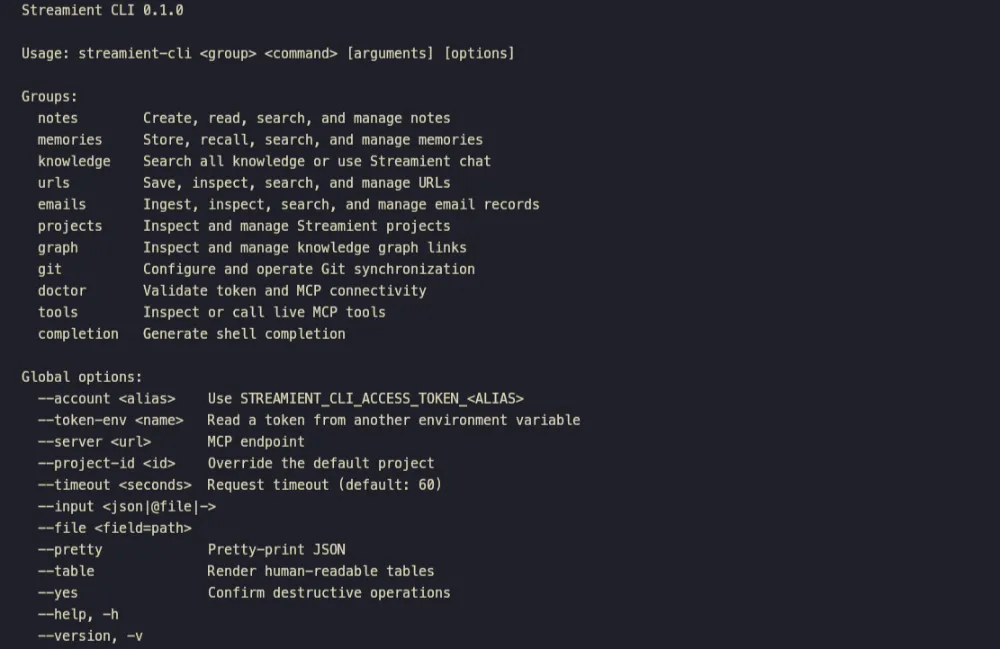
It provides 44 friendly commands covering:
- Notes
- Memories
- Knowledge search and AI chat
- Saved URLs
- Email knowledge
- Projects
- Knowledge-graph relationships
- Git synchronization
Search for previous decisions before changing code. Store the result of an investigation when a job finishes. Save project context from a script.
Trigger Git synchronization. Let an agent retrieve approved knowledge before it begins working.
streamient-cli doctor
streamient-cli knowledge search "What did we decide about onboarding?" --pretty
streamient-cli memories store --title "Release decision" --content "Ship on Thursday"
streamient-cli projects list --table
The CLI returns JSON by default, making its output easy to pipe into jq, scripts, or other tools. It also supports readable tables, formatted JSON, stdin, file input, shell completion, and stable exit codes for automation.
It works with Streamient Cloud and self-hosted installations, supports multiple accounts and projects, and discovers its commands from the connected Streamient server. This keeps it aligned with the server's current permissions, validation, and available capabilities.
Security is deliberate:
- Tokens are read from environment variables, never command arguments.
- Credential-bearing URLs are rejected.
- Destructive operations require explicit confirmation.
- Account and server selection never exposes the underlying token.
The benefit is simple: your team's memory is no longer confined to a browser. It becomes a dependable building block for human workflows, scripts, CI, and AI agents.
Better together
Obsidian and the Streamient CLI represent two sides of modern knowledge work.
Obsidian is where people think and write. The terminal is where workflows execute. Streamient connects them through a shared, searchable, inspectable memory layer.
A note can begin in Obsidian, become useful to an AI agent through Streamient, inform work performed from the terminal, and return with new context for the next person.
No manual exports. No duplicated knowledge silos. No starting over in every tool. Just knowledge that continues to compound.
Available now
Install Streamient Sync from Obsidian Community Plugins. It supports Obsidian 1.13 or newer and is available with Streamient Pro or any self-hosted installation.
Install and configure the Streamient CLI. The public @streamient/cli package requires Node.js 24 or newer.
Your preferred tools should not become knowledge silos. With Streamient, they become part of the same memory system.