
Knowledge Graph Visualization for Team AI Memory: A Practical Guide

A team can search its notes and still miss the connection that answers a question. A support issue may point to a product decision, which points to a pull request, which explains why the behavior changed. Knowledge graph visualization makes those relationships visible as connected objects rather than leaving someone to reconstruct them from separate search results.
That is the useful promise of a graph view. But a collection of linked-looking records is not necessarily a knowledge graph, and a graph-shaped picture is not necessarily useful. For teams using AI tools, the test is whether the view helps a person trace an answer back to the work that supports it.
Streamient is an open-source shared memory layer for teams and their AI tools. Its documented knowledge graph visualizes notes, memories, and URLs through manual links, shared tags, and semantic similarity. People can filter connections and open a node to inspect the underlying item. The examples below show how to evaluate a graph’s usefulness; they do not imply that every illustrative relationship label is a built-in Streamient feature.
What knowledge graph visualization shows
A knowledge graph visualization displays entities as nodes and relationships as edges. In a team's work, a node might represent a project, customer issue, decision, repository, pull request, or person. An edge should say something specific about how two nodes relate: "implements," "supersedes," "reported in," or "owned by," for example.
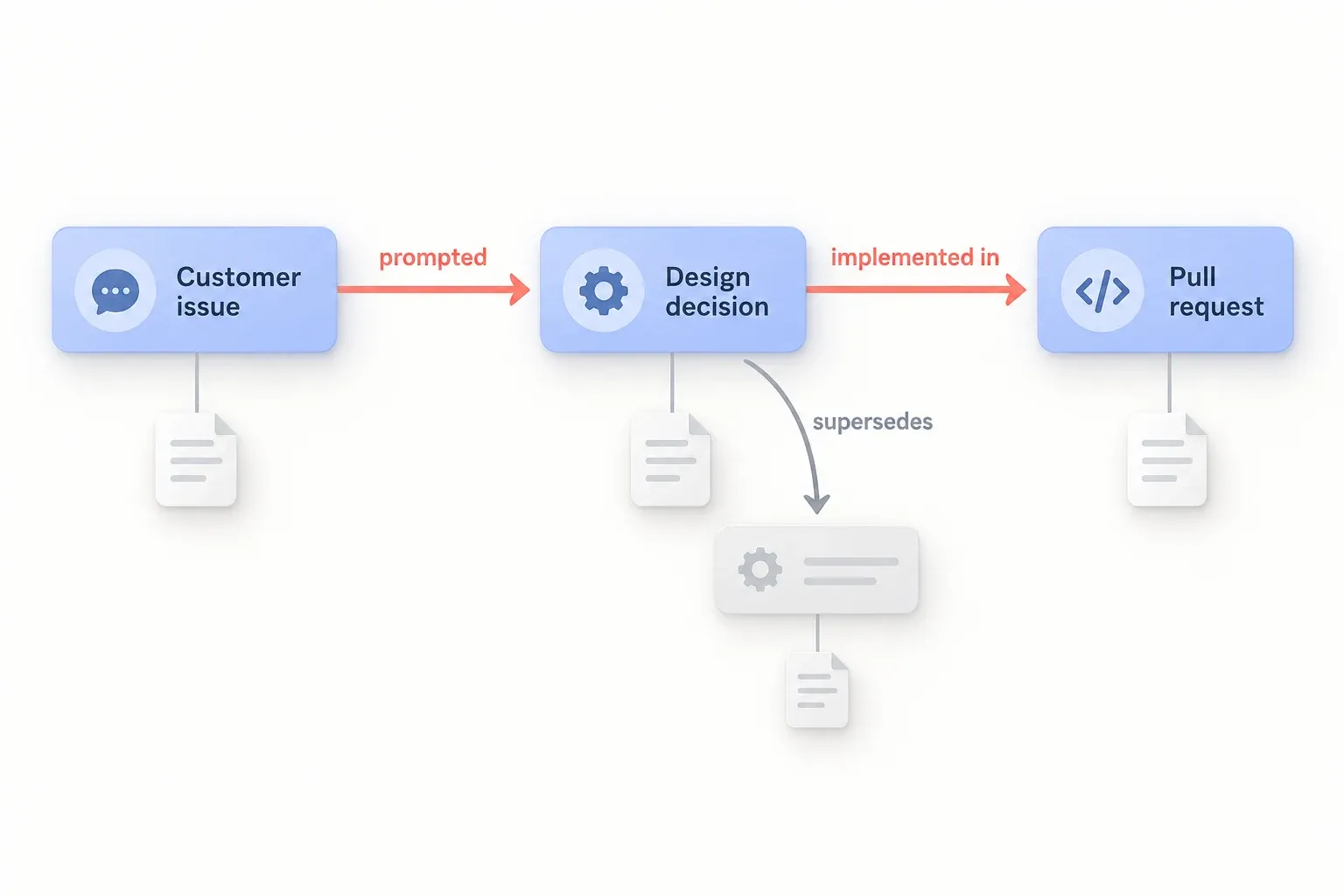
Consider a customer asking why an API response changed. A useful view might show this path:
Customer issue → prompted → design decision → implemented in → pull request
Each step should open the underlying record. The issue establishes what was reported; the decision explains the tradeoff; the pull request shows what changed. Without those records, the diagram is only a claim about a relationship.
This is different from a search results page. Search helps someone find records that match a query. A graph view helps them inspect the connections among records, including a relevant decision they did not know to search for. Both can be useful; neither substitutes for accurate source material.
The test: can someone follow a real question to its sources?
The quickest way to evaluate a graph visualization is to give it a question from actual work. "Why did we change this API?" is better than "Show me everything connected to the API," because it has a clear standard for success.
Start with one answerable question and three or four records you expect to matter. Then check whether the view lets a teammate:
- Identify the starting object. Can they find the issue, project, or decision without knowing an internal identifier?
- Read the relationships. Do edge labels explain the connection, or are the nodes merely near each other on a screen?
- Open the evidence. Can they inspect the email, note, commit, or decision behind a connection?
- Spot conflicts. If a newer decision reverses an older one, is that distinction visible?
- Act on what they find. Can they use the path to answer the question, correct a record, or locate the owner?
If the view fails at the third step, adding more nodes will not fix it. The team needs trustworthy links to source records before it needs a larger diagram. The same principle applies when assessing whether a graph improves AI answers: test it against real answers, not the appearance of a well-connected chart.
Model relationships that carry meaning
The hard part of knowledge graph visualization is deciding what a line between two objects means. A vague "related to" edge can help with exploration, but it does little to explain a decision. A precise edge lets a reader make a more limited, checkable inference.
For a team knowledge library, a small relationship vocabulary could be enough to start:
| Relationship | Example | What someone should be able to verify |
|---|---|---|
| Implements | Pull request → decision | The code change addresses the recorded decision |
| Supersedes | New decision → old decision | The newer choice replaces the earlier one |
| Reported in | Issue → support email | The email contains the reported behavior |
| Documents | Note → project | The note describes that project, not just a passing mention |
These are examples of a possible model, not a list of Streamient graph features. A team should choose relationships that match its records and questions. It should also decide who can correct a mistaken connection. In a shared library, an edge that nobody can inspect or fix becomes another source of misinformation.
Time matters, too. "Project A uses service B" may have been true last quarter and false now. A useful view should not present an old relationship as a current fact without enough context to tell the difference. For a deeper discussion of time-aware graph approaches, see temporal knowledge graphs for AI agents. That article covers a different topic from this practical test of a visual view.
Where visualization helps, and where search is enough
A graph view earns its place when the answer depends on following several distinct relationships. It can help with questions such as:
- Which decisions led to the current behavior of this feature?
- What customer reports are connected to a change in the code?
- Which projects depend on a decision that has been reversed?
- Where did an AI-generated answer get its claim about a workflow?
A diagram is less helpful when someone needs a single known document, an exact phrase, or a list of records matching a tag. In those cases, search may be faster. Streamient’s search and organization updates cover finding and managing records, while its graph offers another way to explore their connections.
This distinction also helps avoid a common design trap: drawing every available object at once. A screen crowded with notes, emails, and commits may demonstrate that data exists, but it makes a specific answer harder to find. A useful graph view would begin with the issue or decision at hand and reveal nearby relationships as needed. It would keep labels and source links readable, even if that means showing less of the library at one time.
Applying the test to shared AI memory
For AI-assisted work, the most valuable connection may be the one between an answer and the team's evidence. Suppose a developer asks Cursor why a particular validation rule exists. The relevant context could include a support report, a design decision, and a code review. If those records are available to the AI tool, it has a better basis for an answer than a chat history that happens to mention the rule.
Visualization could help a person audit that chain: Did the answer cite the active decision? Did a newer review change the implementation? Is the support report about the same product behavior? But the visual layer would be an aid to inspection, not proof that the AI answer is correct. The records and their relationships still need to be maintained.
Streamient addresses the underlying continuity problem by giving MCP-compatible clients access to a shared, editable team library rather than keeping context inside one assistant’s private memory. How shared memory supports context engineering covers that workflow. Its visual graph complements retrieval by helping people inspect connections among records.
If your team is considering a graph view alongside shared memory, test the two needs separately:
- Can the team and its AI tools find the right records? Check whether a fresh session can retrieve the relevant decision and supporting work.
- Can a person understand and verify the connections? Check whether the proposed visualization shows meaningful, source-backed paths between those records.
A "yes" to the first question does not guarantee the second. Conversely, an attractive diagram does not help much if the underlying library is incomplete or out of date.
What to check before choosing a graph view
Use a small set of your own records for a trial: one project, one decision, an earlier decision it replaced, a related issue, and the work that implemented the change. Ask someone who did not create those records to answer a real question using the view. Watch where they get stuck.
Pay particular attention to edge labels, source access, updates, and permissions. Can the person distinguish "mentions" from "implements"? Can they open the supporting record? If a decision changes tomorrow, is there a clear way to correct the path? And does the view respect who is allowed to see the underlying email or project material? Those checks reveal more than a large demonstration graph built from sample data.
For Streamient specifically, start with one project in the Graph view. Compare manual links with connections based on tags or semantic similarity, open the underlying records, and check whether those connections help answer the question. The knowledge graph guide describes filtering, node inspection, and navigation. Keep a distinction between a similarity-based connection and a relationship your team has verified.
A good knowledge graph visualization lets someone move from a question, through named relationships, to inspectable evidence. Start with that path. If the picture cannot help a teammate explain what happened and why, it is not yet doing the work a team needs from it.
Explore Streamient’s graph and shared-memory features and current plans to run the trial with a small set of your own records.